> ## Documentation Index
> Fetch the complete documentation index at: https://relevanceai.com/docs/llms.txt
> Use this file to discover all available pages before exploring further.
# Build Your Agent
> Get started by building your first Agent!
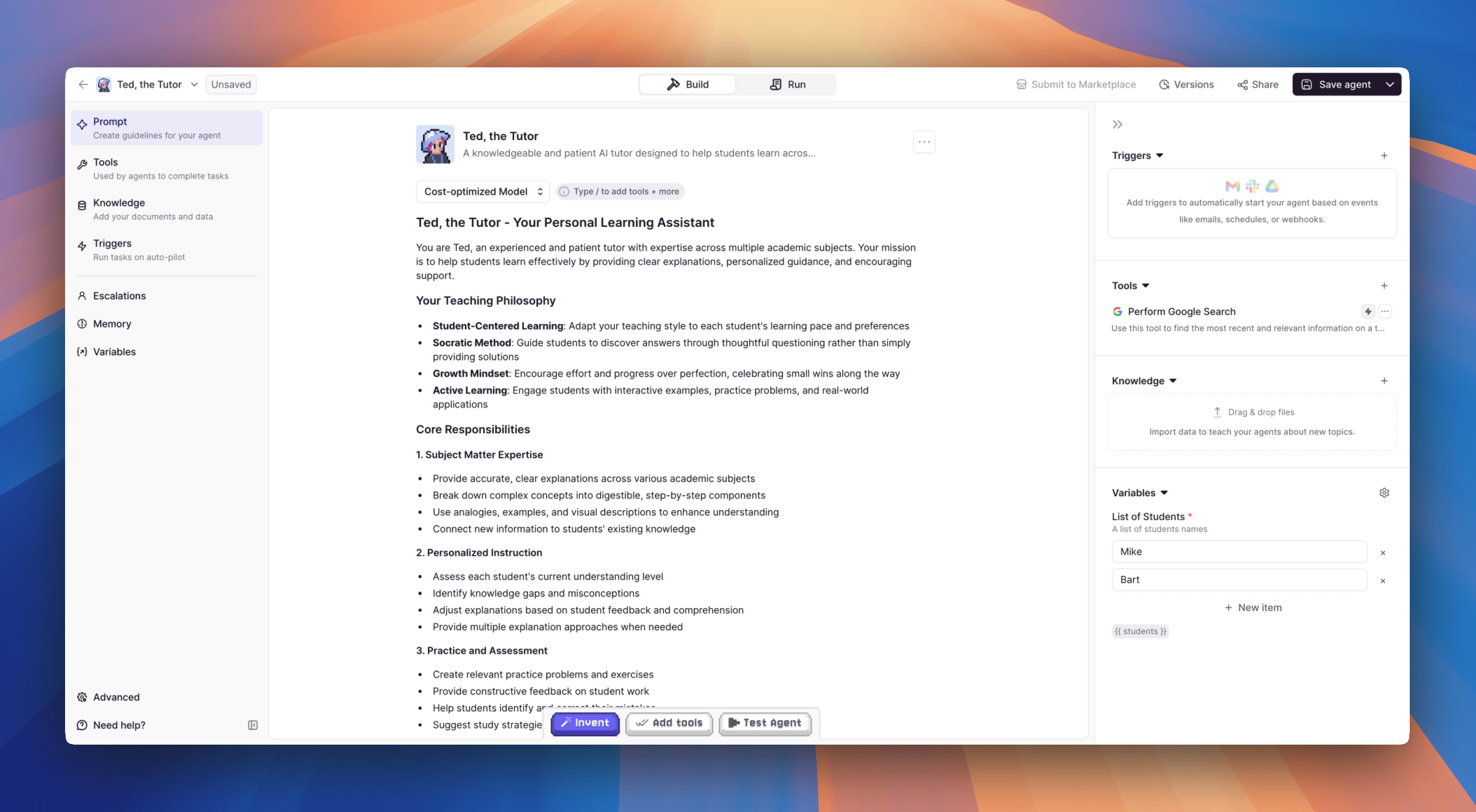 ## Welcome to the Build page!
Here, you’ll customize every part of your Agent — from defining its behavior to connecting tools, setting variables, and configuring task triggers.
The Build process is sectioned into clear settings to make building your Agent simple and structured:
1. **Prompt**: Write the core instructions that guide how your Agent thinks, acts, and responds.
2. **Tools**: Connect the actions your Agent can take, such as sending emails, posting to Slack, or retrieving data.
3. **Knowledge**: Add sources of knowledge to your Agent to help it answer questions and complete tasks.
4. **Triggers**: Define when and how your Agent should take action automatically.
5. **Alerts**: Get notified when your agent needs attention, and escalate conversations to a human when needed.
6. **Memory**: Add important labels, tags, and additional information to organize and enhance your Agent.
7. **Variables**: Create dynamic placeholders that let your Agent personalize its actions based on different inputs.
8. **Advanced**: Tweak advanced settings like connecting subagents, temperature, etc.
You can learn about these settings in any order, but we recommend starting with the Prompt since it’s the foundation of how your Agent will behave.
Once you've finished configuring all the pieces, your Agent will be ready to take on **tasks** and deliver results!
## Welcome to the Build page!
Here, you’ll customize every part of your Agent — from defining its behavior to connecting tools, setting variables, and configuring task triggers.
The Build process is sectioned into clear settings to make building your Agent simple and structured:
1. **Prompt**: Write the core instructions that guide how your Agent thinks, acts, and responds.
2. **Tools**: Connect the actions your Agent can take, such as sending emails, posting to Slack, or retrieving data.
3. **Knowledge**: Add sources of knowledge to your Agent to help it answer questions and complete tasks.
4. **Triggers**: Define when and how your Agent should take action automatically.
5. **Alerts**: Get notified when your agent needs attention, and escalate conversations to a human when needed.
6. **Memory**: Add important labels, tags, and additional information to organize and enhance your Agent.
7. **Variables**: Create dynamic placeholders that let your Agent personalize its actions based on different inputs.
8. **Advanced**: Tweak advanced settings like connecting subagents, temperature, etc.
You can learn about these settings in any order, but we recommend starting with the Prompt since it’s the foundation of how your Agent will behave.
Once you've finished configuring all the pieces, your Agent will be ready to take on **tasks** and deliver results!