> ## Documentation Index
> Fetch the complete documentation index at: https://relevanceai.com/docs/llms.txt
> Use this file to discover all available pages before exploring further.
# Convert string to another format
> How to convert a string into other formats
Strings, the default output of LLMs, can be converted into other formats.
For example, if you ask an LLM to produce a list of strings, you will need to convert the result into an array object to be
able to analyze each element in a `foreach` loop individually.
On this page, we will note some of the common conversions. Please keep in mind that we use LLM output as a string example but
the content applies to any string conversion.
### String to JSON
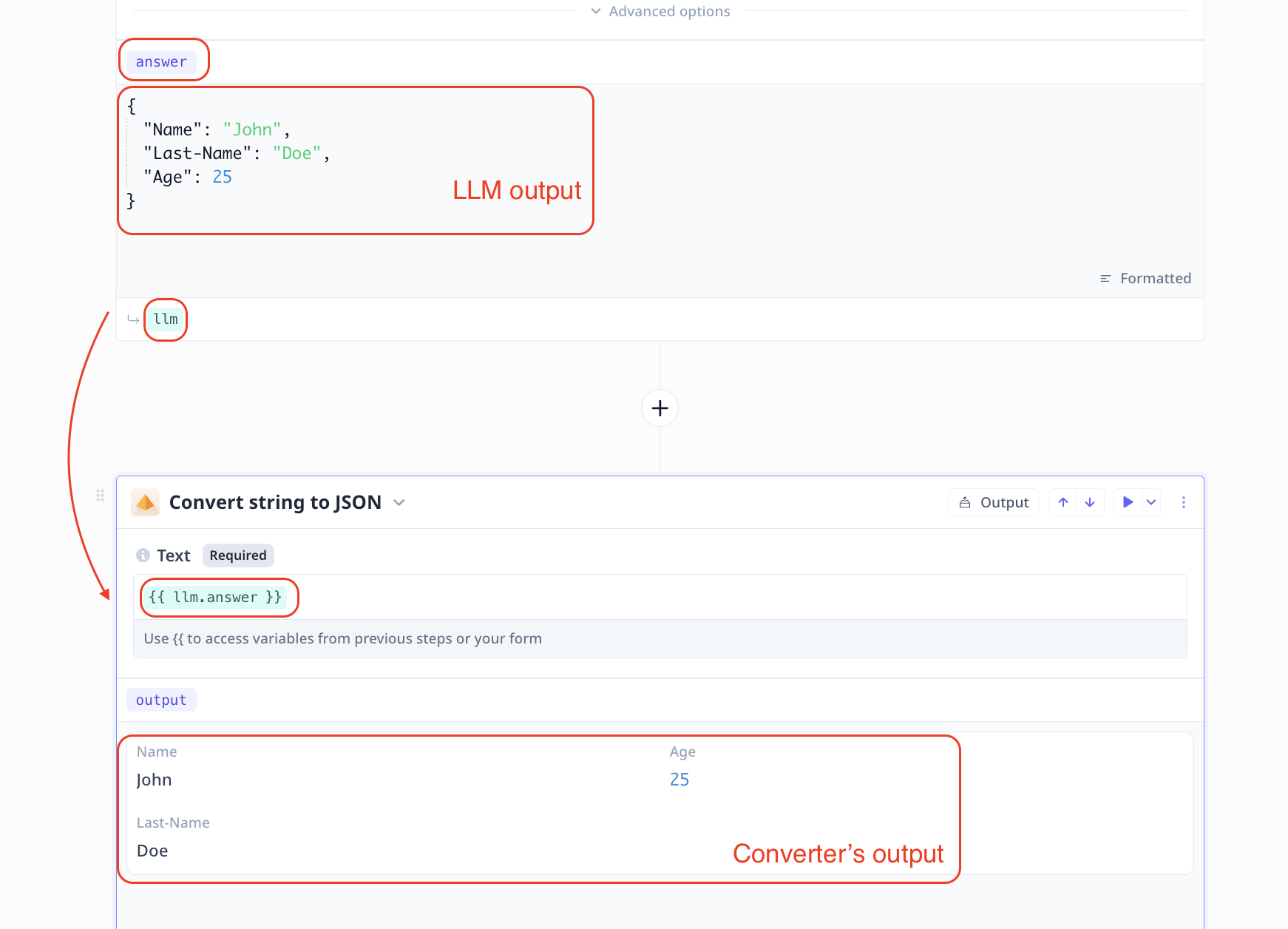
You can use a [Convert string to json](/build/tools/tool-steps/llms/llm-tool-step) step to convert a JSON string
to a JSON object.
In the image below, we pass in the LLM step answer as input into the convertor step and the output is the corresponding
JSON object.
 ### String to list
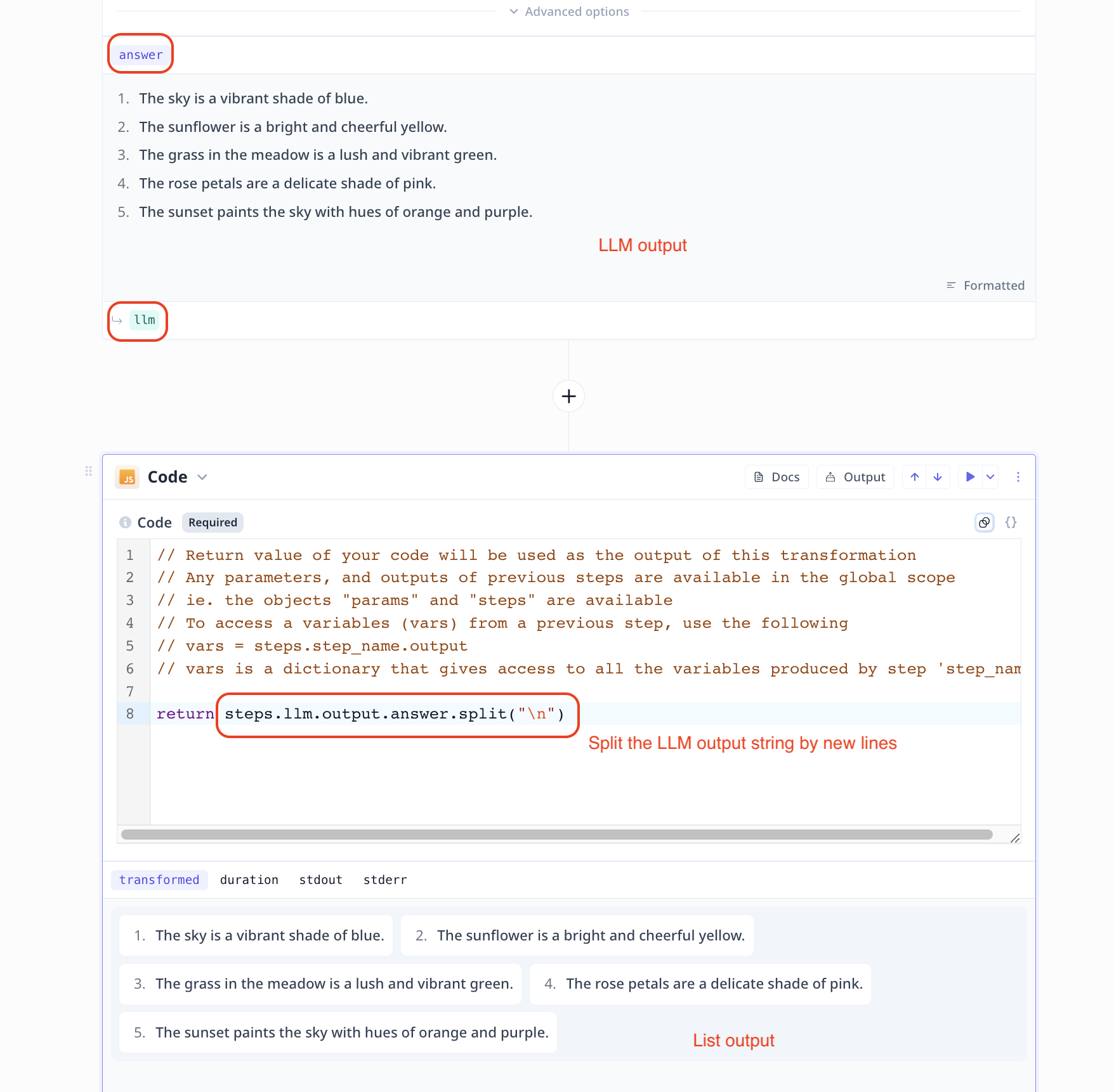
Use a ([JavaScript](/build/tools/tool-steps/code-javascript) Code step or
[Python](/build/tools/tool-steps/python-code/code-python)) Code step to handle the conversion.
All you need to do is to feed the string source value (e.g. LLM step answer) to your code step, apply the change
(e.g. `split(separator)` in JavaScript) and return the value.
```javascript theme={null}
// if the separator is a comma like "a,b,c,d" -> "['a', 'b', 'c', 'd']"
return llm.answer.split(',');
```
### String to list
Use a ([JavaScript](/build/tools/tool-steps/code-javascript) Code step or
[Python](/build/tools/tool-steps/python-code/code-python)) Code step to handle the conversion.
All you need to do is to feed the string source value (e.g. LLM step answer) to your code step, apply the change
(e.g. `split(separator)` in JavaScript) and return the value.
```javascript theme={null}
// if the separator is a comma like "a,b,c,d" -> "['a', 'b', 'c', 'd']"
return llm.answer.split(',');
```
 ### String to Numbers or Booleans
Use a ([JavaScript](/build/tools/tool-steps/code-javascript) Code step or
[Python](/build/tools/tool-steps/python-code/code-python)) Code step to handle the conversion.
All you need to do is to feed the string version of the input (e.g. LLM step answer) to your code step.
For numbers apply the parser (e.g. `parseInt(string-value)` in JavaScript) and return
the results.
```javascript theme={null}
return parseInt(llm.answer);
```
For Booleans, you can simply use a conditional statement (`if ... else ...`) to return
the corresponding Boolean value (True or False).
```javascript theme={null}
return llm.answer === 'true';
```
### String to Numbers or Booleans
Use a ([JavaScript](/build/tools/tool-steps/code-javascript) Code step or
[Python](/build/tools/tool-steps/python-code/code-python)) Code step to handle the conversion.
All you need to do is to feed the string version of the input (e.g. LLM step answer) to your code step.
For numbers apply the parser (e.g. `parseInt(string-value)` in JavaScript) and return
the results.
```javascript theme={null}
return parseInt(llm.answer);
```
For Booleans, you can simply use a conditional statement (`if ... else ...`) to return
the corresponding Boolean value (True or False).
```javascript theme={null}
return llm.answer === 'true';
```