> ## Documentation Index
> Fetch the complete documentation index at: https://relevanceai.com/docs/llms.txt
> Use this file to discover all available pages before exploring further.
# Memory
> How the agent remembers your preferences, corrections, and context across conversations
Memory is how the agent learns about you across conversations. It stores your preferences, corrections, project context, and references so the agent gets better over time — without you having to repeat yourself.
The agent checks your memory at the start of every conversation, so it always has your context before it starts working.
## Where to find memory
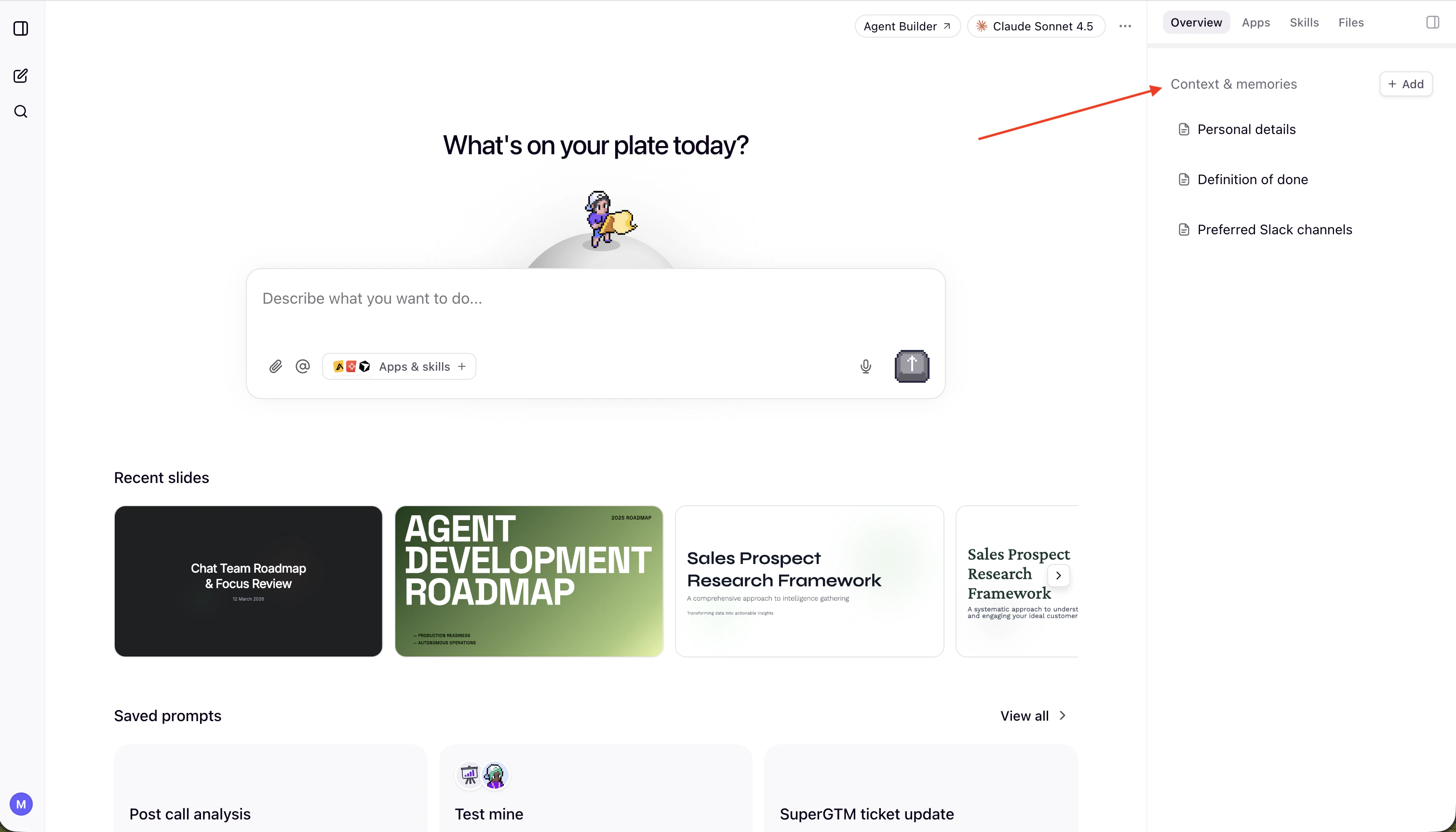 You can view and manage your memories in the **Overview** tab, under **Context & Memories**. From here you can see all stored memories, review what the agent has learned about you, and remove anything that's outdated or incorrect.
Memory is scoped per user. Your memory is not shared with other users in your project.
## How it works
The agent maintains a memory entry for each thing it learns about you. At the start of each conversation, the agent reads a memory index and opens the individual entries relevant to your request. Those are loaded into the agent's context alongside your message.
The agent doesn't load everything every time — it loads what's relevant. The more clearly your memories are described, the better the selection works.
## Memory types
Information about you — your role, goals, expertise, and preferences. The agent uses this to tailor its work to who you are. For example, you might store that you're a VP of Sales managing a team of 8 AEs focused on enterprise accounts, that you prefer data-driven insights and concise communication, or that you have deep HubSpot experience but are new to Slack integrations.
Corrections and guidance you've given the agent. These are the most impactful memories — they prevent the agent from repeating mistakes. For example, you might correct the agent to keep email drafts professional but warm with no corporate jargon, to avoid including pricing in first outreach emails, or to always present data as bullet points rather than paragraphs.
Context about ongoing work, goals, and timelines that the agent wouldn't otherwise know. For example, you might store that the enterprise team has a \$2.4M pipeline target for Q3 closing September 30, that the Q2 campaign is focused on enterprise expansion, or that a product launch is scheduled for June 15 with deliverables due by June 10.
Pointers to where information lives, so the agent knows where to look. For example, you might tell the agent that deal stage definitions are in the HubSpot wiki under "Sales Process > Deal Stages", that the competitive analysis is saved in project files under /research/competitors.md, or that customer feedback is tracked in a Notion database called "Product Feedback".
## Building up memory over time
You don't need to set up memory all at once. The agent builds it naturally as you work together.
Ask the agent to save something to memory at any time:
> "Remember that I prefer bullet points over paragraphs"
> "Remember that the Q3 target is \$2.4M"
The agent will confirm what it stored and which memory type it used.
When you correct the agent — "No, don't include pricing in the first email" — it saves a feedback memory so it doesn't make the same mistake next time.
If a memory is outdated or incorrect:
> "Forget what you know about the Q2 campaign"
The agent will find and remove the relevant memory.
## How skills and memory work together
[Skills](/get-started/chat/super-gtm/skills) and memory complement each other:
* **Skills define the process.** A skill tells the agent *how* to do something — the steps, the data sources, the output format.
* **Memory personalizes the execution.** Memory tells the agent *your way* of doing it — your tone, your preferences, your priorities.
A well-written skill references memory where it matters. For example, a post-meeting follow-up skill tells the agent to check your memory for communication preferences before drafting emails. The skill is the same for everyone on the team, but the output adapts to each person's style.
This means you can share a project skill with your whole team, and each person's agent executes it differently based on their individual memory.
You can view and manage your memories in the **Overview** tab, under **Context & Memories**. From here you can see all stored memories, review what the agent has learned about you, and remove anything that's outdated or incorrect.
Memory is scoped per user. Your memory is not shared with other users in your project.
## How it works
The agent maintains a memory entry for each thing it learns about you. At the start of each conversation, the agent reads a memory index and opens the individual entries relevant to your request. Those are loaded into the agent's context alongside your message.
The agent doesn't load everything every time — it loads what's relevant. The more clearly your memories are described, the better the selection works.
## Memory types
Information about you — your role, goals, expertise, and preferences. The agent uses this to tailor its work to who you are. For example, you might store that you're a VP of Sales managing a team of 8 AEs focused on enterprise accounts, that you prefer data-driven insights and concise communication, or that you have deep HubSpot experience but are new to Slack integrations.
Corrections and guidance you've given the agent. These are the most impactful memories — they prevent the agent from repeating mistakes. For example, you might correct the agent to keep email drafts professional but warm with no corporate jargon, to avoid including pricing in first outreach emails, or to always present data as bullet points rather than paragraphs.
Context about ongoing work, goals, and timelines that the agent wouldn't otherwise know. For example, you might store that the enterprise team has a \$2.4M pipeline target for Q3 closing September 30, that the Q2 campaign is focused on enterprise expansion, or that a product launch is scheduled for June 15 with deliverables due by June 10.
Pointers to where information lives, so the agent knows where to look. For example, you might tell the agent that deal stage definitions are in the HubSpot wiki under "Sales Process > Deal Stages", that the competitive analysis is saved in project files under /research/competitors.md, or that customer feedback is tracked in a Notion database called "Product Feedback".
## Building up memory over time
You don't need to set up memory all at once. The agent builds it naturally as you work together.
Ask the agent to save something to memory at any time:
> "Remember that I prefer bullet points over paragraphs"
> "Remember that the Q3 target is \$2.4M"
The agent will confirm what it stored and which memory type it used.
When you correct the agent — "No, don't include pricing in the first email" — it saves a feedback memory so it doesn't make the same mistake next time.
If a memory is outdated or incorrect:
> "Forget what you know about the Q2 campaign"
The agent will find and remove the relevant memory.
## How skills and memory work together
[Skills](/get-started/chat/super-gtm/skills) and memory complement each other:
* **Skills define the process.** A skill tells the agent *how* to do something — the steps, the data sources, the output format.
* **Memory personalizes the execution.** Memory tells the agent *your way* of doing it — your tone, your preferences, your priorities.
A well-written skill references memory where it matters. For example, a post-meeting follow-up skill tells the agent to check your memory for communication preferences before drafting emails. The skill is the same for everyone on the team, but the output adapts to each person's style.
This means you can share a project skill with your whole team, and each person's agent executes it differently based on their individual memory.