> ## Documentation Index
> Fetch the complete documentation index at: https://relevanceai.com/docs/llms.txt
> Use this file to discover all available pages before exploring further.
# Audio to utterance data table
> Transcribe audio and save utterances (all or topic focused) as a separate table.
## Introduction
Welcome to the documentation for the "Audio to Utterance - Data Table" Tool! This Tool is designed to transcribe audio files and
save the transcribed utterances as a structured data table. It allows you to focus on certain topics to deepen the analysis.
Whether you're a market researcher, content creator, or business analyst, this Tool will assist you in efficiently organizing and
analyzing your audio data. Furthermore, the resulting dataset can be used as knowledge for further AI analysis.
 ## Overview
The "Audio to Utterance - Data Table" Tool leverages state-of-the-art speech recognition algorithms to transcribe audio files accurately.
It goes beyond simple transcription and provides the ability to focus on all speakers or just the interviewees. Furthermore, you can specify
target themes and topics. Final results are saved as a structured data table.
This feature allows you to organize and analyze your audio data in a more efficient and systematic manner.
With its powerful capabilities and user-friendly design, it is the perfect solution for audio analysis.
Keep in mind that the resulting dataset can be used as knowledge for a next step AI analysis.
## Overview
The "Audio to Utterance - Data Table" Tool leverages state-of-the-art speech recognition algorithms to transcribe audio files accurately.
It goes beyond simple transcription and provides the ability to focus on all speakers or just the interviewees. Furthermore, you can specify
target themes and topics. Final results are saved as a structured data table.
This feature allows you to organize and analyze your audio data in a more efficient and systematic manner.
With its powerful capabilities and user-friendly design, it is the perfect solution for audio analysis.
Keep in mind that the resulting dataset can be used as knowledge for a next step AI analysis.
 ## Key Features
1. **Accurate Transcription**:
The "Audio to Utterance - data table" Tool utilizes advanced AI techniques to transcribe audio files accurately. It analyzes the audio content,
identifies speech patterns, and converts them into text with high precision. This feature ensures that you receive reliable and accurate transcriptions,
allowing you to focus on extracting valuable insights from your audio data.
When working with video files, to avoid upload issues, extract the audio before upload and directly work with the audio content.
2. **Speaker Identification**:
The tool can identify different speakers in the audio recording and attribute the transcribed utterances to each speaker. This speaker identification
feature is particularly useful in interviews, panel discussions, or any audio recording with multiple participants. It allows you to differentiate
between speakers and analyze their contributions separately.
3. **Time Stamps**:
The tool provides time stamps for each transcribed utterance, indicating the exact timing of when it was spoken in the audio recording. These time
stamps enable you to align the transcribed text with the original audio, facilitating accurate referencing and analysis.
4. **Customizable Target Themes**:
You have the flexibility to focus on all or a certain subset of discussed themes/topics. This customization ensures that the Tool accurately identifies
utterances relevant to the target analysis.
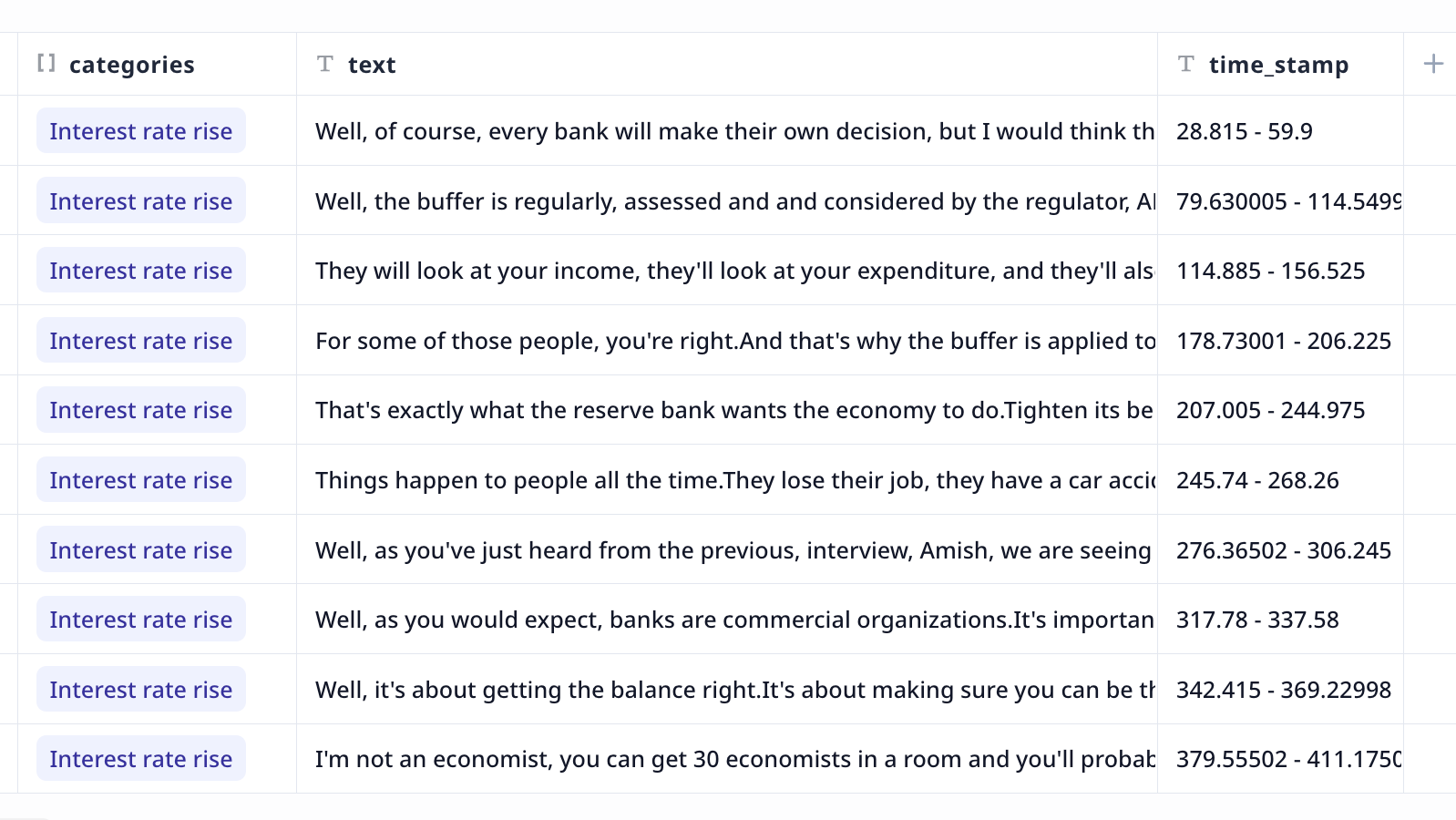
5. **Organized Results**:
The Tool provides the results as a data table saved on your account. This table is accessible under the [Data](/get-started/key-concepts/knowledge) page.
Columns are
* text: utterances
* speaker: speaker labels
* start and end time of each utterance
* categories: a list of most relevant categories from the specified list
You can easily navigate through the data table or extract the results as a CSV file. This organized format saves you time and effort in manually
reviewing and analyzing your audio data. Furthermore, you can use this theme-focused dataset of utterances as knowledge for more AI analysis.
## How to use the Tool
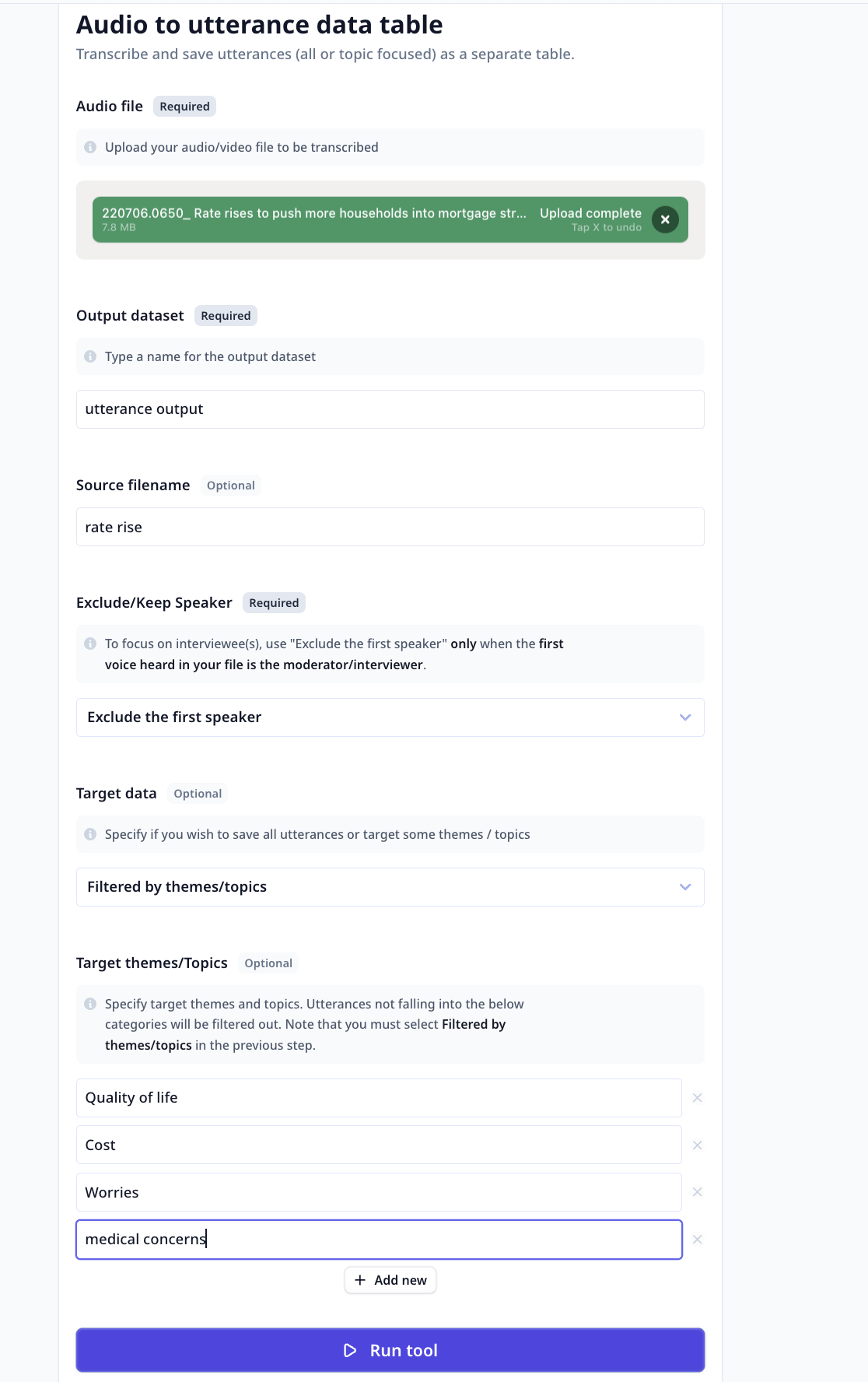
Using the "Audio to Utterance - Data table" Tool is a simple and straightforward process. Follow these steps to transcribe and analyze your audio files:
* **Upload Audio File**: Select the audio file you want to transcribe and analyze. The Tool supports various file formats, including MP3, WAV, MP4, and more.
Ensure that the audio file is accessible and available for upload.
* **Specify Output Dataset**: Type a name for the output dataset that will contain the transcribed text and marked sections. This dataset will be created to
store the results of the analysis.
* **Specify Source File Name (Optional)**: If desired, you can provide a name for the source file. This name will be used to identify the audio file within
the output dataset.
* **Keep/Exclude the First Speaker**: If you wish to focus on responses provided by the interviewees, make sure the moderator is the first person heard in
the audio and select `Exclude the First Speaker`.
* **Target Themes/Categories**: Apart from filtering by speaker, there are options for filtering utterances by theme/category.
Select `Filter by themes/topics` under "Target data" and enter the list if target categories to filter out non-relevant utterances.
This way, the Tool will analyze the transcribed text and identify utterances matching these topics.
You can build a Tool which receives a transcription as input and [suggests applicable categories](/templates/category-tag-suggester).
Note that the existing Tool is designed for analyzing survey responses and some modifications might be needed to fine-tune it for interview
analysis.
* **Run the Tool**: Once you have provided the input and configured your desired setup, click the "Run Tool" button (on the App page) or use
the run options on your data table (bulk/single run) to initiate the the analysis process.
#### Tool execution at Relevance
The Tool will transcribe the audio, identify utterances matching the configured criteria.
* **View Results**: The Tool will provide you with the transcribed text and extracted utterances in the output dataset.
Go to [Data](/get-started/key-concepts/knowledge) and refresh the page. You can explore the transcribed text, review the
extracted utterances and export the table content into a CSV file.
### What can be next?
1. Apply the above analysis to all your recordings (bulk run) and have one table containing all important and insightful utterances
2. Use the resulting table as [knowledge](/build/tools/knowledge/knowledge) in a Tool similar to
[Focused summarization and quote extraction](/templates/focused-summarization-quote).
## Deep dive in the Tool
## Key Features
1. **Accurate Transcription**:
The "Audio to Utterance - data table" Tool utilizes advanced AI techniques to transcribe audio files accurately. It analyzes the audio content,
identifies speech patterns, and converts them into text with high precision. This feature ensures that you receive reliable and accurate transcriptions,
allowing you to focus on extracting valuable insights from your audio data.
When working with video files, to avoid upload issues, extract the audio before upload and directly work with the audio content.
2. **Speaker Identification**:
The tool can identify different speakers in the audio recording and attribute the transcribed utterances to each speaker. This speaker identification
feature is particularly useful in interviews, panel discussions, or any audio recording with multiple participants. It allows you to differentiate
between speakers and analyze their contributions separately.
3. **Time Stamps**:
The tool provides time stamps for each transcribed utterance, indicating the exact timing of when it was spoken in the audio recording. These time
stamps enable you to align the transcribed text with the original audio, facilitating accurate referencing and analysis.
4. **Customizable Target Themes**:
You have the flexibility to focus on all or a certain subset of discussed themes/topics. This customization ensures that the Tool accurately identifies
utterances relevant to the target analysis.
5. **Organized Results**:
The Tool provides the results as a data table saved on your account. This table is accessible under the [Data](/get-started/key-concepts/knowledge) page.
Columns are
* text: utterances
* speaker: speaker labels
* start and end time of each utterance
* categories: a list of most relevant categories from the specified list
You can easily navigate through the data table or extract the results as a CSV file. This organized format saves you time and effort in manually
reviewing and analyzing your audio data. Furthermore, you can use this theme-focused dataset of utterances as knowledge for more AI analysis.
## How to use the Tool
Using the "Audio to Utterance - Data table" Tool is a simple and straightforward process. Follow these steps to transcribe and analyze your audio files:
* **Upload Audio File**: Select the audio file you want to transcribe and analyze. The Tool supports various file formats, including MP3, WAV, MP4, and more.
Ensure that the audio file is accessible and available for upload.
* **Specify Output Dataset**: Type a name for the output dataset that will contain the transcribed text and marked sections. This dataset will be created to
store the results of the analysis.
* **Specify Source File Name (Optional)**: If desired, you can provide a name for the source file. This name will be used to identify the audio file within
the output dataset.
* **Keep/Exclude the First Speaker**: If you wish to focus on responses provided by the interviewees, make sure the moderator is the first person heard in
the audio and select `Exclude the First Speaker`.
* **Target Themes/Categories**: Apart from filtering by speaker, there are options for filtering utterances by theme/category.
Select `Filter by themes/topics` under "Target data" and enter the list if target categories to filter out non-relevant utterances.
This way, the Tool will analyze the transcribed text and identify utterances matching these topics.
You can build a Tool which receives a transcription as input and [suggests applicable categories](/templates/category-tag-suggester).
Note that the existing Tool is designed for analyzing survey responses and some modifications might be needed to fine-tune it for interview
analysis.
* **Run the Tool**: Once you have provided the input and configured your desired setup, click the "Run Tool" button (on the App page) or use
the run options on your data table (bulk/single run) to initiate the the analysis process.
#### Tool execution at Relevance
The Tool will transcribe the audio, identify utterances matching the configured criteria.
* **View Results**: The Tool will provide you with the transcribed text and extracted utterances in the output dataset.
Go to [Data](/get-started/key-concepts/knowledge) and refresh the page. You can explore the transcribed text, review the
extracted utterances and export the table content into a CSV file.
### What can be next?
1. Apply the above analysis to all your recordings (bulk run) and have one table containing all important and insightful utterances
2. Use the resulting table as [knowledge](/build/tools/knowledge/knowledge) in a Tool similar to
[Focused summarization and quote extraction](/templates/focused-summarization-quote).
## Deep dive in the Tool