> ## Documentation Index
> Fetch the complete documentation index at: https://relevanceai.com/docs/llms.txt
> Use this file to discover all available pages before exploring further.
# Audio to utterance - Mark sections
> Transcribe, identify utterances containing pre-specified questions, mark utterances that could be answers to pre-specified questions, and save the results in a new table
## Introduction
Welcome to the documentation for the "Audio to Utterance - Mark Sections" Tool! This Tool is designed to transcribe audio files,
extract utterances and match them with a pre-specified list of questions.
Whether you are a market researcher, interviewer, or content creator, this Tool will assist you in efficiently analyzing and organizing
your audio data and access the point of interest.
With its advanced AI capabilities and user-friendly interface, this Tool is a game-changer for extracting valuable insights from your
interviews or conversations.
## Overview
The "Audio to Utterance - Mark Sections" Tool leverages cutting-edge artificial intelligence techniques and large language models to
transcribe audio files accurately. It goes beyond simple transcription and provides the ability to extract individual utterances and match
them with a pre-specified list of questions. Utterances are labelled with questions where labels specify
* beginning of a section: an utterance containing one of the questions or a near duplicate of the question
* potential answer: an utterance that could potentially be answers to any of the pre-specified questions
By using this Tool, you can save time and effort in manually reviewing and analyzing your audio data. With its powerful capabilities and
intuitive design, it is the perfect solution for efficient audio analysis and organization.
 ## Key Features
1. **Accurate Transcription**:
The "Audio to Utterance - Mark Sections" Tool utilizes advanced AI techniques to transcribe audio files accurately. It analyzes the audio content,
identifies speech patterns, and converts them into text with high precision. This feature ensures that you receive reliable and accurate transcriptions,
allowing you to focus on extracting valuable insights from your audio data.
When working with video files, to avoid upload issues, extract the audio before upload and directly work with the audio content.
2. **Question Identification**:
Simply specify the list of questions that you want to target in the audio data. The Tool analyzes the transcribed text and identifies utterances
that contain those questions. This feature saves you time and effort in manually searching for specific questions.
3. **Answer Marking**:
The Tool goes a step further by marking utterances that could potentially be answers to the pre-specified questions. It analyzes the context,
content, and relationships between utterances to identify potential answers. This marking feature allows you to quickly locate and extract
relevant answers from your audio data.
4. **Customizable Target Questions**:
You have the flexibility to focus on all or a certain subset of discussed questions. Whether you have a list of interview questions, survey prompts,
or any other type of questions, you can input them into the Tool. This customization ensures that the Tool accurately identifies the desired
questions and potential answers.
Questions identification is done based on semantic and concept matching. Therefore, there is no need for the wordings to be exactly the same.
However, the closer the wording the higher accuracy in near duplicate identification.
5. **Organized Results**:
The Tool provides the results as a data table saved on your account. This table is accessible under the [Data](/docs/get-started/key-concepts/knowledge) page.
Columns are
* text: utterances
* speaker: speaker labels
* start and end time of each utterance
* source\_file\_name: name of the original uploaded audio file
* near\_duplicate\_question: if the model can identify an utterance containing a near duplicate question to one of the pre-specified questions
* matching\_question: if the model labels an utterance as a possible answer to one of the pre-specified questions
You can easily navigate through the data table or extract the results as a CSV file. This organized format saves you time and effort in manually
reviewing and analyzing your audio data.
## How to use the Tool
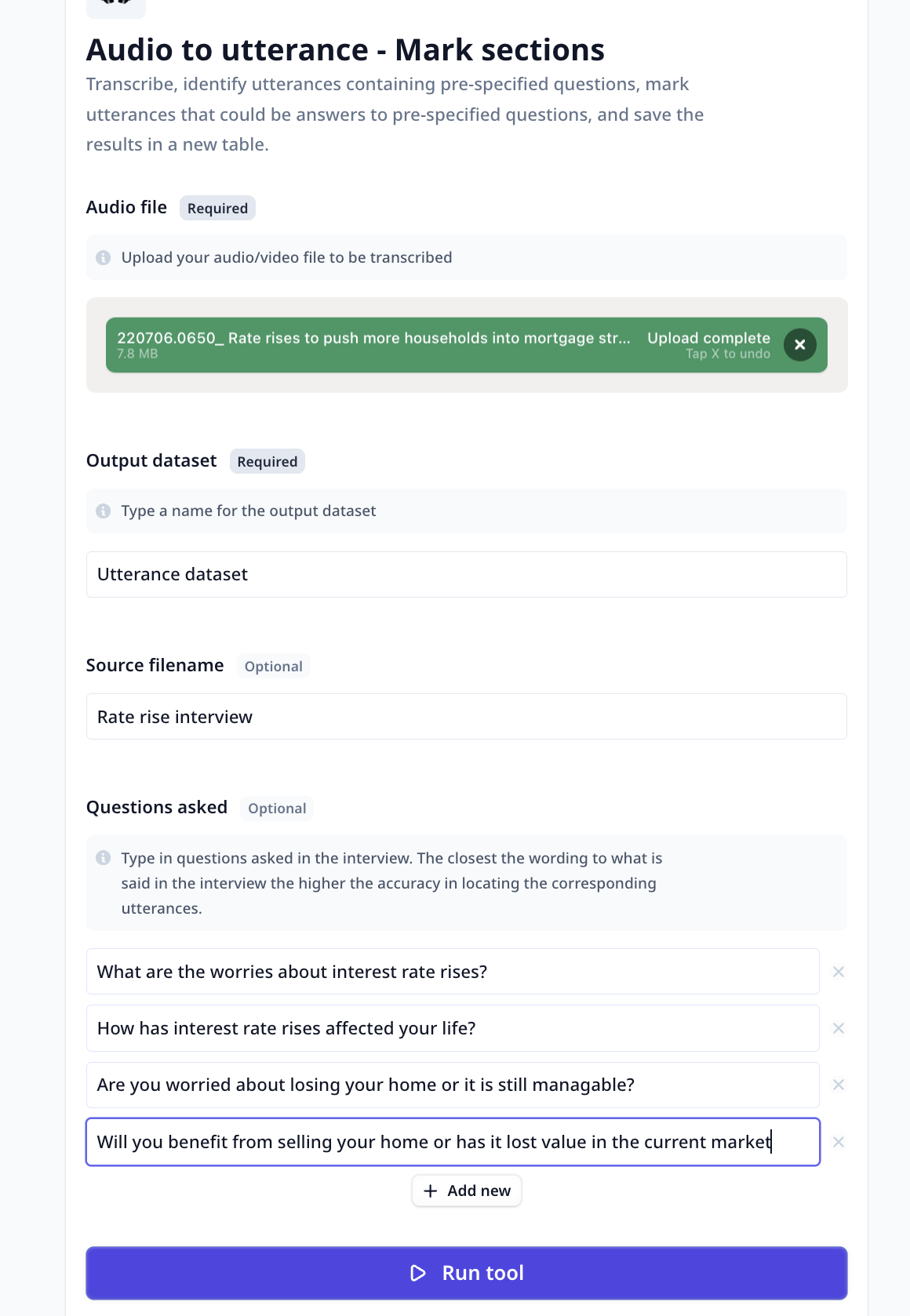
Using the Audio to Utterance - Mark Sections Tool is a simple and straightforward process. Follow these steps to transcribe and analyze your audio files:
* **Upload Audio File**: Select the audio file you want to transcribe and analyze. The Tool supports various file formats, including MP3, WAV, MP4, and more.
Ensure that the audio file is accessible and available for upload.
* **Specify Output Dataset**: Type a name for the output dataset that will contain the transcribed text and marked sections. This dataset will be created to
store the results of the analysis.
* **Specify Source File Name (Optional)**: If desired, you can provide a name for the source file. This name will be used to identify the audio file within
the output dataset.
* **Target Questions**: Type in a list of questions that you want to target in the audio data. The Tool will analyze the transcribed text and locate utterances
containing these questions or utterances containing answers to the questions.
* **Run the Tool**: Once you have provided the input and configured your desired setup, click the "Run Tool" button (on the App page) or use
the run options on your data table (bulk/single run) to initiate the the analysis process.
#### Tool execution at Relevance
The Tool will transcribe the audio, identify utterances with the specified questions, and mark potential answers.
* **View Results**: The Tool will provide you with the transcribed text and the marked sections in the output dataset.
Go to [Data](/docs/get-started/key-concepts/knowledge) and refresh the page.
You can explore the transcribed text, review the marked utterances and export the table content into
a CSV file.
## Deep dive in the Tool
## Key Features
1. **Accurate Transcription**:
The "Audio to Utterance - Mark Sections" Tool utilizes advanced AI techniques to transcribe audio files accurately. It analyzes the audio content,
identifies speech patterns, and converts them into text with high precision. This feature ensures that you receive reliable and accurate transcriptions,
allowing you to focus on extracting valuable insights from your audio data.
When working with video files, to avoid upload issues, extract the audio before upload and directly work with the audio content.
2. **Question Identification**:
Simply specify the list of questions that you want to target in the audio data. The Tool analyzes the transcribed text and identifies utterances
that contain those questions. This feature saves you time and effort in manually searching for specific questions.
3. **Answer Marking**:
The Tool goes a step further by marking utterances that could potentially be answers to the pre-specified questions. It analyzes the context,
content, and relationships between utterances to identify potential answers. This marking feature allows you to quickly locate and extract
relevant answers from your audio data.
4. **Customizable Target Questions**:
You have the flexibility to focus on all or a certain subset of discussed questions. Whether you have a list of interview questions, survey prompts,
or any other type of questions, you can input them into the Tool. This customization ensures that the Tool accurately identifies the desired
questions and potential answers.
Questions identification is done based on semantic and concept matching. Therefore, there is no need for the wordings to be exactly the same.
However, the closer the wording the higher accuracy in near duplicate identification.
5. **Organized Results**:
The Tool provides the results as a data table saved on your account. This table is accessible under the [Data](/docs/get-started/key-concepts/knowledge) page.
Columns are
* text: utterances
* speaker: speaker labels
* start and end time of each utterance
* source\_file\_name: name of the original uploaded audio file
* near\_duplicate\_question: if the model can identify an utterance containing a near duplicate question to one of the pre-specified questions
* matching\_question: if the model labels an utterance as a possible answer to one of the pre-specified questions
You can easily navigate through the data table or extract the results as a CSV file. This organized format saves you time and effort in manually
reviewing and analyzing your audio data.
## How to use the Tool
Using the Audio to Utterance - Mark Sections Tool is a simple and straightforward process. Follow these steps to transcribe and analyze your audio files:
* **Upload Audio File**: Select the audio file you want to transcribe and analyze. The Tool supports various file formats, including MP3, WAV, MP4, and more.
Ensure that the audio file is accessible and available for upload.
* **Specify Output Dataset**: Type a name for the output dataset that will contain the transcribed text and marked sections. This dataset will be created to
store the results of the analysis.
* **Specify Source File Name (Optional)**: If desired, you can provide a name for the source file. This name will be used to identify the audio file within
the output dataset.
* **Target Questions**: Type in a list of questions that you want to target in the audio data. The Tool will analyze the transcribed text and locate utterances
containing these questions or utterances containing answers to the questions.
* **Run the Tool**: Once you have provided the input and configured your desired setup, click the "Run Tool" button (on the App page) or use
the run options on your data table (bulk/single run) to initiate the the analysis process.
#### Tool execution at Relevance
The Tool will transcribe the audio, identify utterances with the specified questions, and mark potential answers.
* **View Results**: The Tool will provide you with the transcribed text and the marked sections in the output dataset.
Go to [Data](/docs/get-started/key-concepts/knowledge) and refresh the page.
You can explore the transcribed text, review the marked utterances and export the table content into
a CSV file.
## Deep dive in the Tool