> ## Documentation Index
> Fetch the complete documentation index at: https://relevanceai.com/docs/llms.txt
> Use this file to discover all available pages before exploring further.
# GPT on my files
> Ask GPT to find the answer to your question in a file
## Introduction
Welcome to the documentation for the "GPT on My File" Tool!
This Tool is designed to provide you with answers to your questions on any PDF, CSV, or audio files using the power of GPT.
Whether you are a researcher, analyst, or a professional in any field, this Tool will assist you in extracting valuable
insights from your files in the matter of seconds.
## Overview
The "GPT on My File" Tool leverages the advanced capabilities of GPT to analyze and generate responses to your questions based
on the content of files you provide.
By inputting a file and a question, the Tool utilizes natural language processing and machine learning techniques to provide
you with accurate and informative answers.
By harnessing the power of AI and offering a user-friendly interface, this Tool transforms the way you extract knowledge from your files.
 ## Key Features
1. **File Compatibility**:
The "GPT on My File" Tool supports a wide range of file formats, including PDF, CSV, and audio files. Whether you have research papers,
data tables, or recorded interviews, this Tool can handle them all.
Simply provide the Tool with the URL of your file, and it will extract the necessary information for analysis.
2. **Natural Language Processing and Machine Learning Capabilities**:
The Tool utilizes a large language model to understand the context and meaning of your questions.
It analyzes the structure and content of your files to generate accurate and relevant responses.
3. **User-Friendly Interface**:
The "GPT on My File" Tool features a user-friendly and intuitive design. You can easily upload your files, input your questions, and
receive prompt and informative responses.
The Tool ensures a seamless and enjoyable user experience, allowing you to focus on the insights rather than the technicalities.
## How to use the Tool
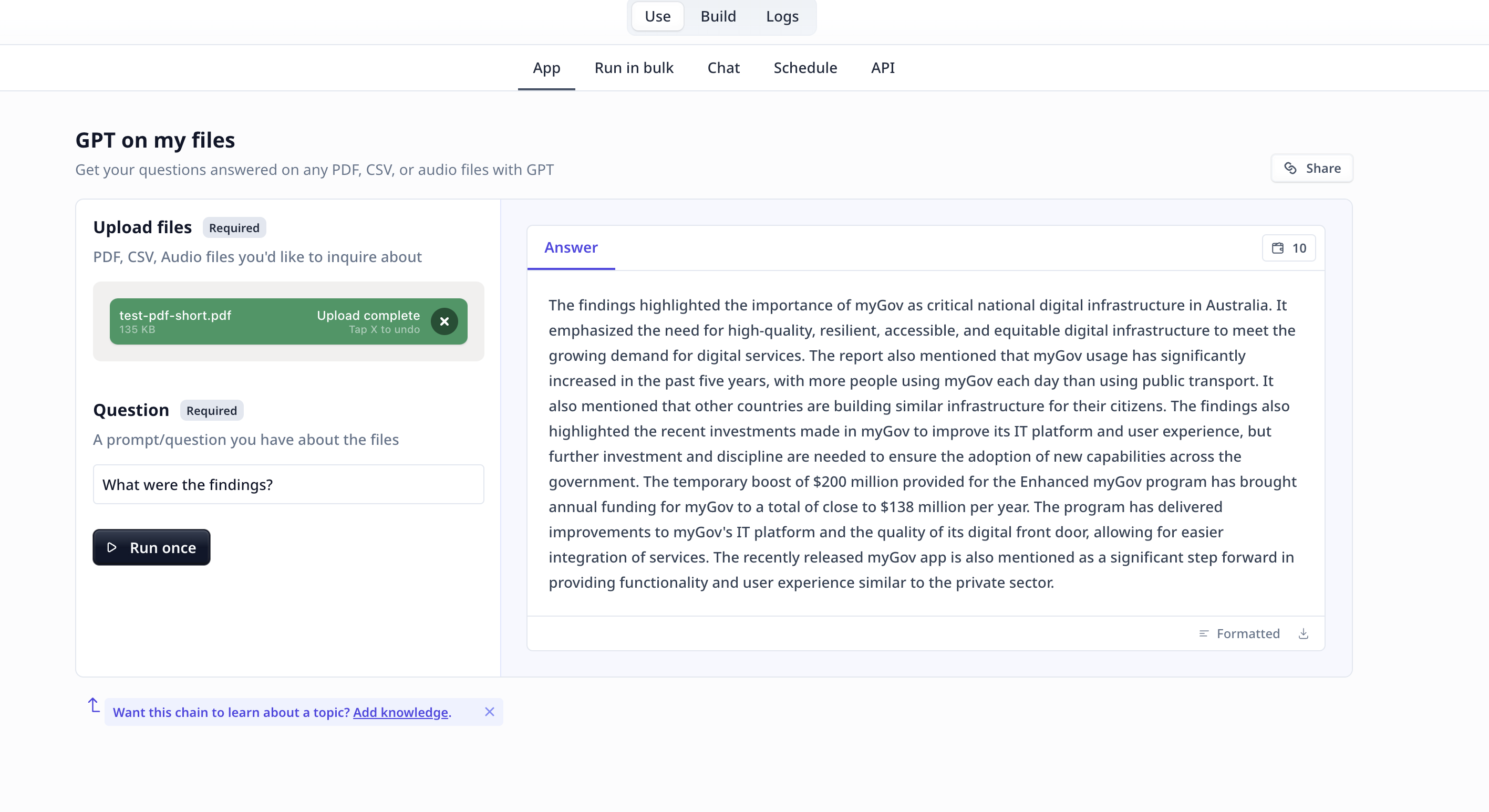
Follow these steps to extract valuable insights from your files:
* **Upload File**: Upload the file you want to analyze. The Tool supports PDF, CSV, and audio file formats.
* **Input Question**: Enter your question or prompt in the designated field. Be clear and specific to receive accurate and relevant
responses. You can even instruct the Tool to format the output in your desired way.
LLMs are not designed or trained for statistical analysis. Questions like
"How many projects were conducted?" or "What was the overall success on the x projects?"
are likely to raise the "I could not find the answer" response unless there is a note in
the provided information stating the answer.
* **Run the Tool**: Once you have uploaded the file and entered your question, click the "Run Tool" button (on the App page) or use
the run options on your data table (bulk/single run) to initiate the the analysis process. The Tool will process the file and generate
a response based on the content and context of the file.
#### Tool execution at Relevance
* **View Answer**: The Tool will provide you with a response to your question based on the information extracted from the file.
## Deep dive in the Tool
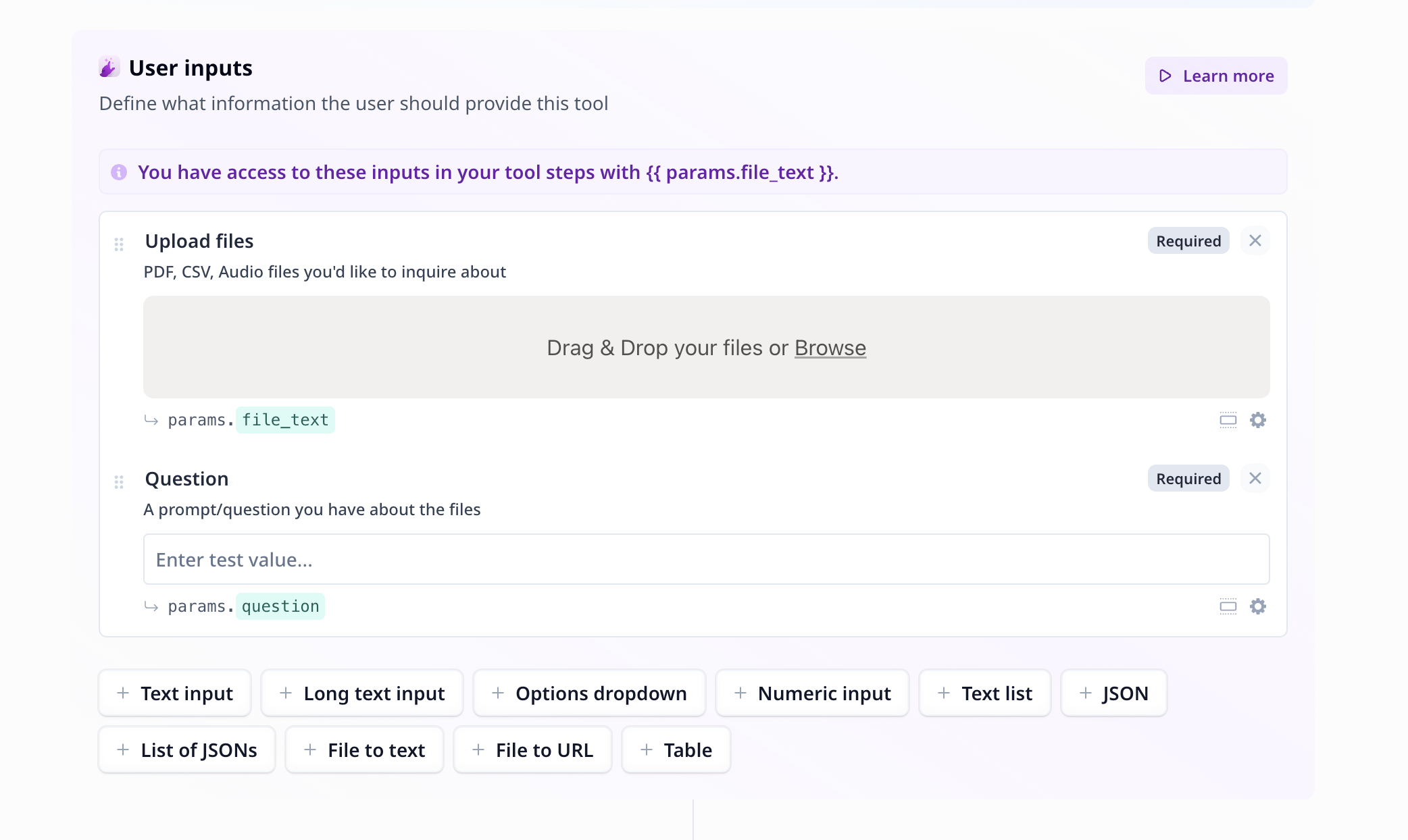
### User inputs
## Key Features
1. **File Compatibility**:
The "GPT on My File" Tool supports a wide range of file formats, including PDF, CSV, and audio files. Whether you have research papers,
data tables, or recorded interviews, this Tool can handle them all.
Simply provide the Tool with the URL of your file, and it will extract the necessary information for analysis.
2. **Natural Language Processing and Machine Learning Capabilities**:
The Tool utilizes a large language model to understand the context and meaning of your questions.
It analyzes the structure and content of your files to generate accurate and relevant responses.
3. **User-Friendly Interface**:
The "GPT on My File" Tool features a user-friendly and intuitive design. You can easily upload your files, input your questions, and
receive prompt and informative responses.
The Tool ensures a seamless and enjoyable user experience, allowing you to focus on the insights rather than the technicalities.
## How to use the Tool
Follow these steps to extract valuable insights from your files:
* **Upload File**: Upload the file you want to analyze. The Tool supports PDF, CSV, and audio file formats.
* **Input Question**: Enter your question or prompt in the designated field. Be clear and specific to receive accurate and relevant
responses. You can even instruct the Tool to format the output in your desired way.
LLMs are not designed or trained for statistical analysis. Questions like
"How many projects were conducted?" or "What was the overall success on the x projects?"
are likely to raise the "I could not find the answer" response unless there is a note in
the provided information stating the answer.
* **Run the Tool**: Once you have uploaded the file and entered your question, click the "Run Tool" button (on the App page) or use
the run options on your data table (bulk/single run) to initiate the the analysis process. The Tool will process the file and generate
a response based on the content and context of the file.
#### Tool execution at Relevance
* **View Answer**: The Tool will provide you with a response to your question based on the information extracted from the file.
## Deep dive in the Tool
### User inputs
 1.
2.
### Tool steps
1.
2.
### Tool steps
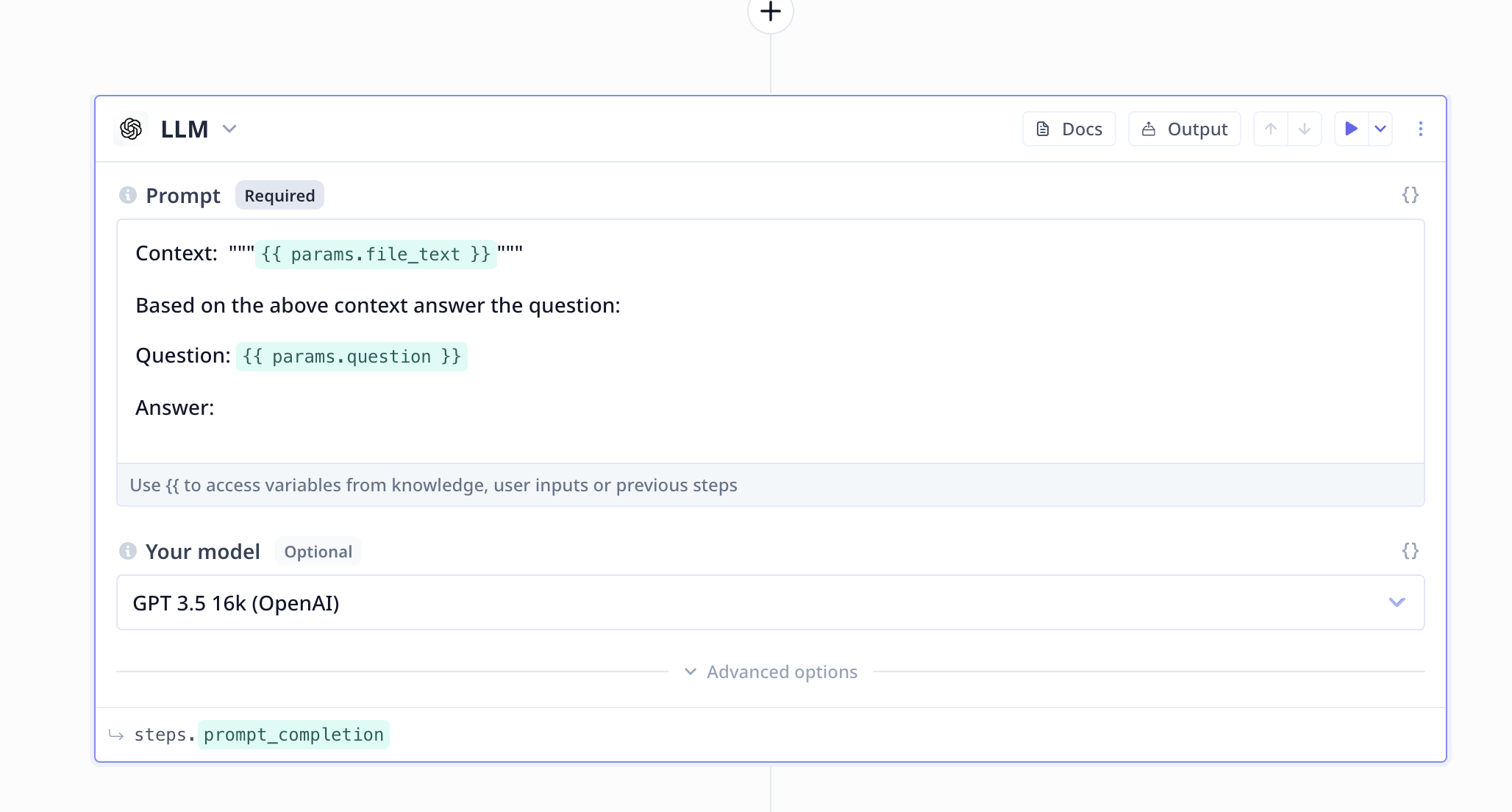 #### Large Language Model (LLM)
1. Provide the context at the top
2. Be short and precise with your instruction/request from the LLM
#### Large Language Model (LLM)
1. Provide the context at the top
2. Be short and precise with your instruction/request from the LLM