> ## Documentation Index
> Fetch the complete documentation index at: https://relevanceai.com/docs/llms.txt
> Use this file to discover all available pages before exploring further.
# Summarize meeting transcript
> Summarize a meeting transcript based on the specified agenda and focus points
## Introduction
Welcome to the documentation for the "Summarize Meeting Transcript" Tool! This Tool is designed to provide you with accurate
and useful summaries of meeting transcripts. Whether you are a busy professional, a team leader, or a researcher, this Tool
will assist you in quickly extracting the key points and insights from your meeting discussions.
Relying on state-of-the-art natural language processing capabilities and a seamlessly user-friendly interface,
this Tool represents a paradigm shift in the realm of meeting summarization, facilitating optimal efficiency.
## Overview
The "Summarize Meeting Transcript" Tool leverages cutting-edge natural language processing techniques to analyze meeting transcripts
and generate concise summaries. It eliminates the need for manual note-taking and saves you valuable time and effort. By summarizing
the transcript, this Tool enables you to focus on the most important aspects of the meeting and easily share the key takeaways with
your team. With its intuitive design and powerful AI capabilities, it is the perfect solution for extracting valuable insights from
your meetings.
 ## Key Features
1. **Accurate Summarization**:
The "Summarize Meeting Transcript" Tool utilizes advanced language models to accurately summarize meeting transcripts. It identifies
the noted key points in the discussion and generates a summary that captures the essence of the meeting. This feature saves you time
and effort by condensing lengthy transcripts into concise and informative summaries.
2. **Contextual Understanding**:
The Tool goes beyond simple keyword extraction and understands the context of the meeting discussion. It captures the overall flow of
the conversation. This contextual understanding enables the Tool to generate summaries that provide a comprehensive overview of the
meeting's content.
Use the Build page to access the set up and directly instruct the LLM. for instance, you can customize the length of the generated summary.
More details are provided in the Deep dive in the Tool section.
3. **User-Friendly Interface**:
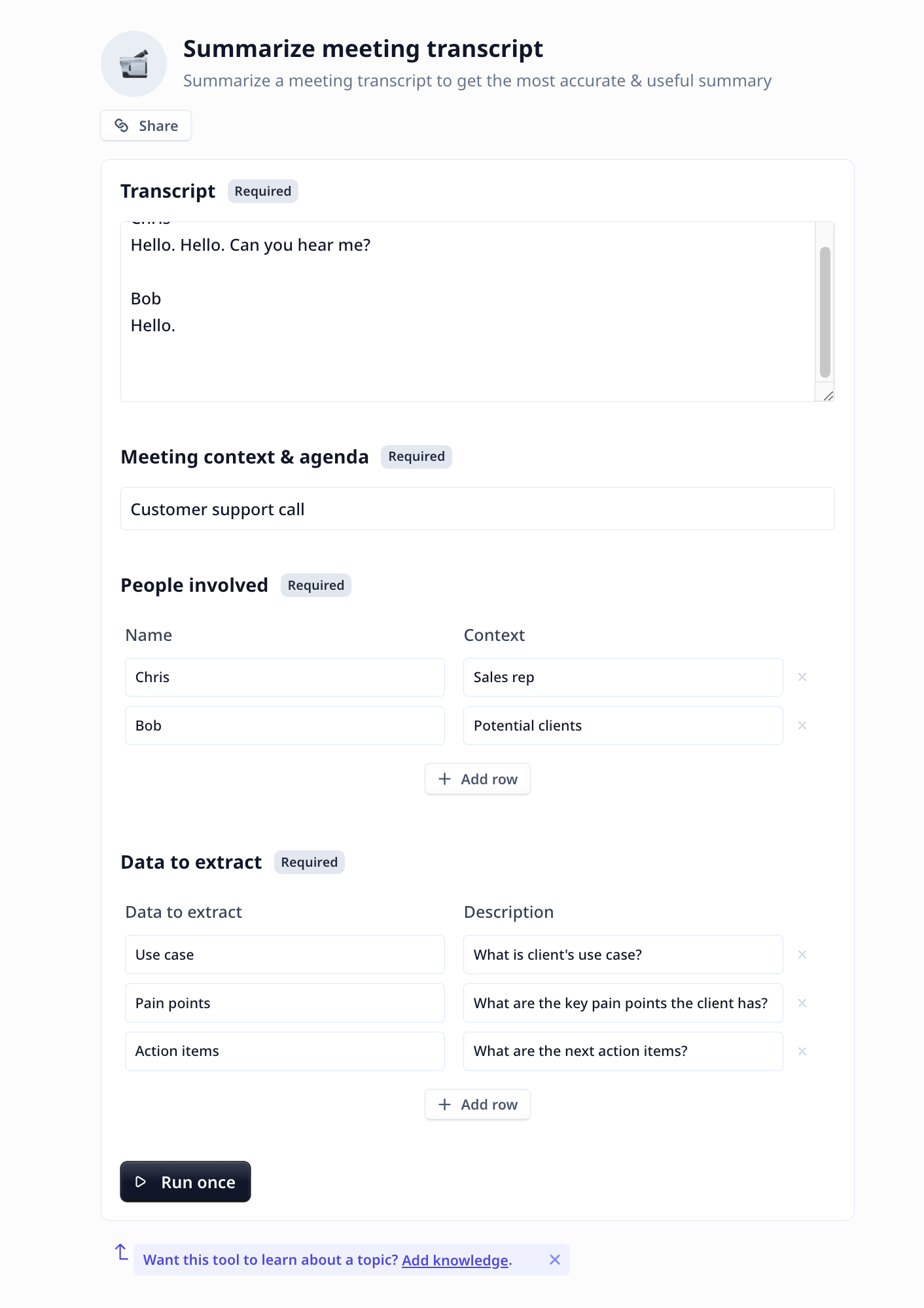
The "Summarize Meeting Transcript" Tool features a user-friendly interface. Simply provide the transcript, fill the form and specify the
themes and topics of interest. The Tool will process the transcript and generate a concise summary in a matter of seconds.
The intuitive design ensures a seamless and enjoyable user experience, allowing you to focus on the insights rather than the technicalities.
## How to use the Tool
Follow these steps to generate a summary of your meeting transcript:
* **Transcript**: Provide the meeting transcript via copy/paste.
* **Meeting Context and Agenda**: This helps the large language model to understand the context better and focus on the target.
* **People involve**: Providing the names make the summary easier to follow.
* **Data to extract**: Specify the target themes and topics to be included in the summary.
* **Run the Tool**: Once you have filled the form, click the "Run Tool" button (on the App page) or use
the run options on your data table (bulk/single run) to initiate the the analysis process. The Tool will analyze the transcript and
generate a concise summary based on the content and context of the meeting discussion.
#### Tool execution at Relevance
## Deep dive in the Tool
### User inputs
## Key Features
1. **Accurate Summarization**:
The "Summarize Meeting Transcript" Tool utilizes advanced language models to accurately summarize meeting transcripts. It identifies
the noted key points in the discussion and generates a summary that captures the essence of the meeting. This feature saves you time
and effort by condensing lengthy transcripts into concise and informative summaries.
2. **Contextual Understanding**:
The Tool goes beyond simple keyword extraction and understands the context of the meeting discussion. It captures the overall flow of
the conversation. This contextual understanding enables the Tool to generate summaries that provide a comprehensive overview of the
meeting's content.
Use the Build page to access the set up and directly instruct the LLM. for instance, you can customize the length of the generated summary.
More details are provided in the Deep dive in the Tool section.
3. **User-Friendly Interface**:
The "Summarize Meeting Transcript" Tool features a user-friendly interface. Simply provide the transcript, fill the form and specify the
themes and topics of interest. The Tool will process the transcript and generate a concise summary in a matter of seconds.
The intuitive design ensures a seamless and enjoyable user experience, allowing you to focus on the insights rather than the technicalities.
## How to use the Tool
Follow these steps to generate a summary of your meeting transcript:
* **Transcript**: Provide the meeting transcript via copy/paste.
* **Meeting Context and Agenda**: This helps the large language model to understand the context better and focus on the target.
* **People involve**: Providing the names make the summary easier to follow.
* **Data to extract**: Specify the target themes and topics to be included in the summary.
* **Run the Tool**: Once you have filled the form, click the "Run Tool" button (on the App page) or use
the run options on your data table (bulk/single run) to initiate the the analysis process. The Tool will analyze the transcript and
generate a concise summary based on the content and context of the meeting discussion.
#### Tool execution at Relevance
## Deep dive in the Tool
### User inputs
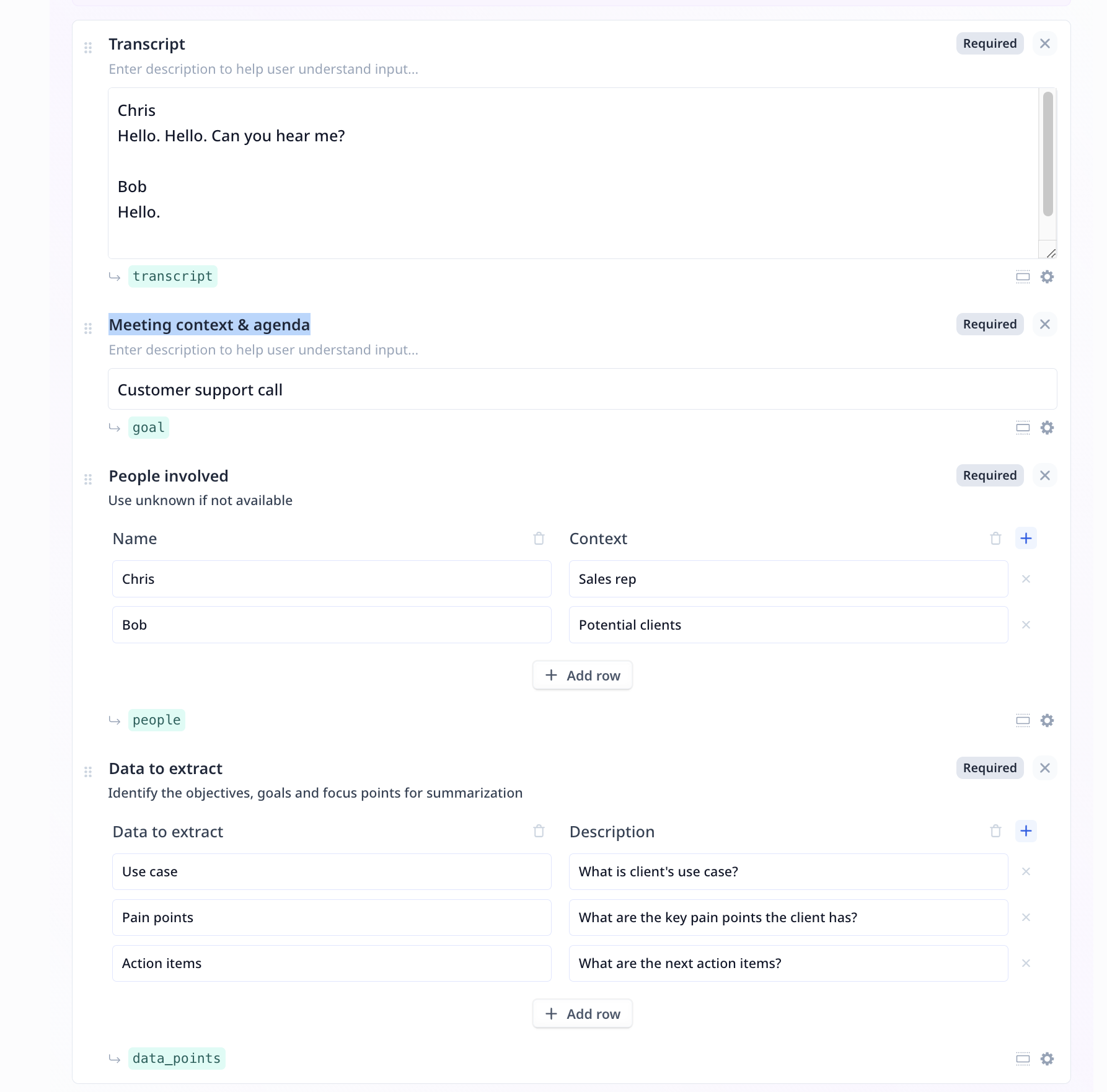 1.
This component is to provide the transcription and is of type long tex inputs.
2.
This component is to briefly overview the meeting agenda and is of Text input type.
3.
This component is used twice both for providing names and roles of the people in the recording
and to specify the objectives, goals and focus points for summarization.
* Enter the names and roles (Use unknown if the data is not available)
* Enter the data you wish to extract along with a brief explanation
### Tool steps
There is only 1 LLM component under the Tool steps in this analysis flow.
#### Large Language Model (LLM)
1.
This component is to provide the transcription and is of type long tex inputs.
2.
This component is to briefly overview the meeting agenda and is of Text input type.
3.
This component is used twice both for providing names and roles of the people in the recording
and to specify the objectives, goals and focus points for summarization.
* Enter the names and roles (Use unknown if the data is not available)
* Enter the data you wish to extract along with a brief explanation
### Tool steps
There is only 1 LLM component under the Tool steps in this analysis flow.
#### Large Language Model (LLM)
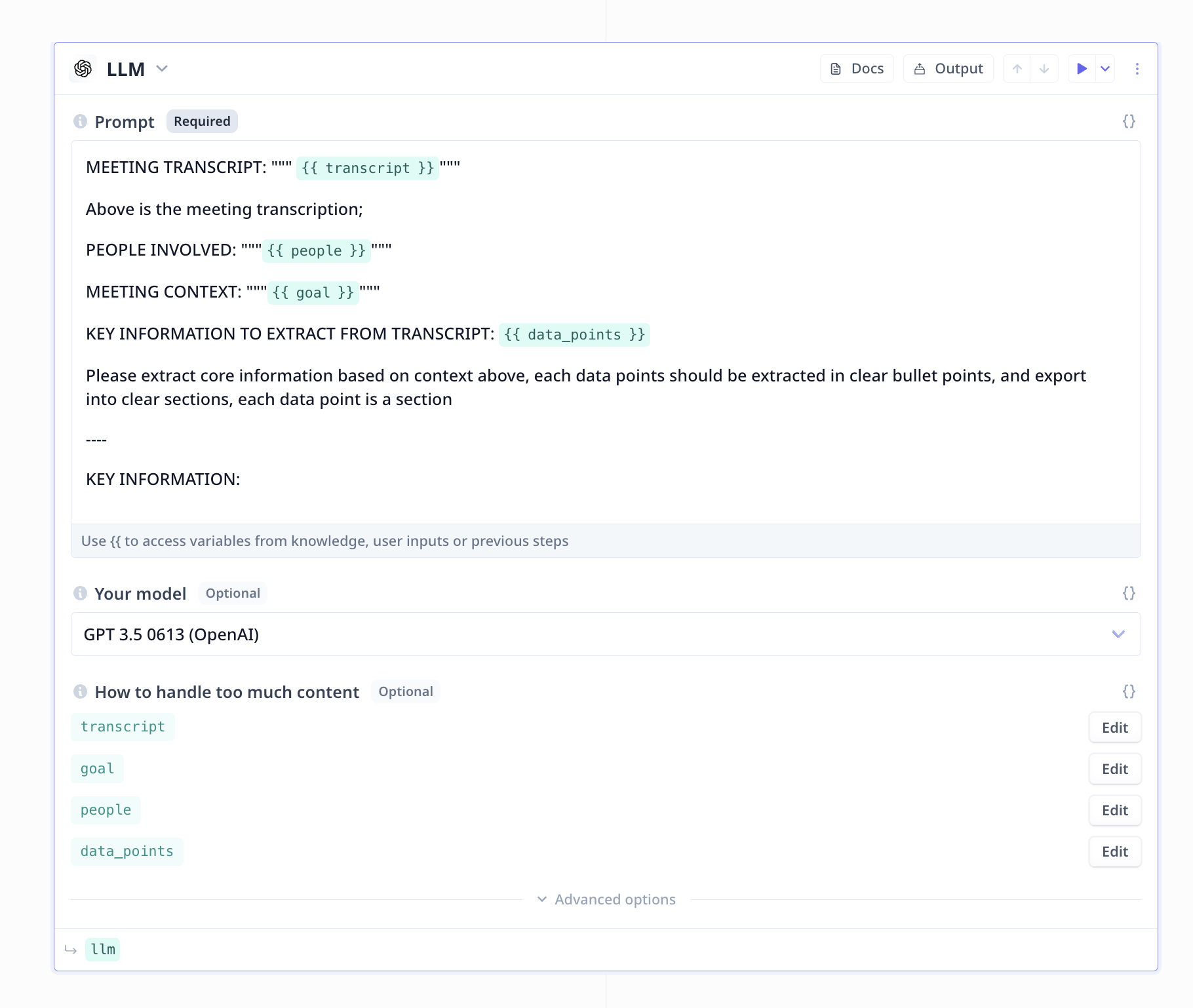 **[A Good Prompt](/build/tools/tool-steps/llms/prompt)**
1. Be short and precise with your instruction/request from the LLM
2. Note the goals and important instructions closes possible to the end of the prompt
3. Specify a data scope using `"`, `"""` or similar identifiers
4. Include formatting instruction when necessary
**[A Good Prompt](/build/tools/tool-steps/llms/prompt)**
1. Be short and precise with your instruction/request from the LLM
2. Note the goals and important instructions closes possible to the end of the prompt
3. Specify a data scope using `"`, `"""` or similar identifiers
4. Include formatting instruction when necessary